Overview
- Order import
- Stock sync
- Push tracking updates
- Import pricing
- Import new products
- Works with bundles
Setup
First create a SOAP / XML API role from System > Web Services Settings
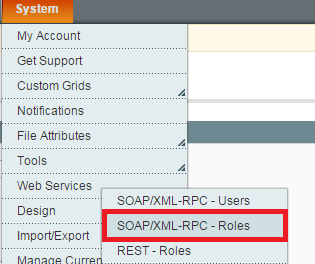
Click add a new role and choose a role name
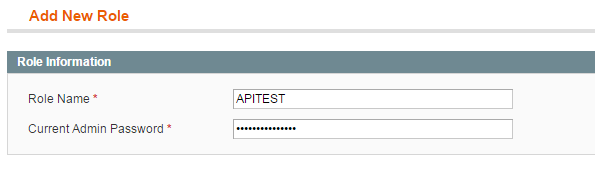
Under the role resources tab change access to ALL

From the same navigation go to System > Web Services > Add New SOAP / XML User
Click "Add New User" and fill in the required info
Now please add a GUID API key. You can generate one from https://www.guidgenerator.com/
Now Click "User Role" and allocate the API role we created earlier to the user

You will now be presented with your API details, please add these to the Magento connection on Fulfillable or provide them to your account manager
Please be sure to also note your Magento version and provide it to us
Connecting Magento 1
On Fulfillable please navigate to Connect > Order Integrations > Magento

Now click "Add Account"

And fill in the following information we collected earlier
- URL: https://www.{yourwebsite}/index.php/api/v2_soap/
- UserName: (Created On Magento)
- ApiKey: (Created On Magento)

Now Fill In
- Order Prefix: Enter if your want your order numbers to be appended
- Delay: Leave as default (15)
- Active: Enabled
- Version: Please enter your SOAP API version, if you are unsure please consult with your Magento developer
- ImportPersonalisationOptions: Optional
-
Convert product name and description to lower case: Optional

Now Fill In
- Name & Description Mapping: Optional
- Ready Status: Leave as default "Processing" or map to your own Magento order status if using custom order statuses.
- Picking Status Leave as default "Processing" or map to your own Magento order status if using custom order statuses.
- Despatched Status Leave as default "Complete" or map to your own Magento order status if using custom order statuses.
- Notify When Add Shipment Comment: Optional
- Sync Stock Levels: Enabled
- Stock Sync Delay: 15-60 Minutes
 Finally Fill In
- Sync New Products: Enable if you want Fulfillable to automatically sync new products
- Product Sync Delay: 60
- Only Import Countries In Selected Shipping Zone: Enable if you only want to import orders from selected shipping zones.
- Notify When Creating Shipment: Enabled
- Send Shipment Info After Creating Shipment: Enabled

Now click "Add" and the integration is completed

Advanced & Troubleshooting
WSI-I Compliance
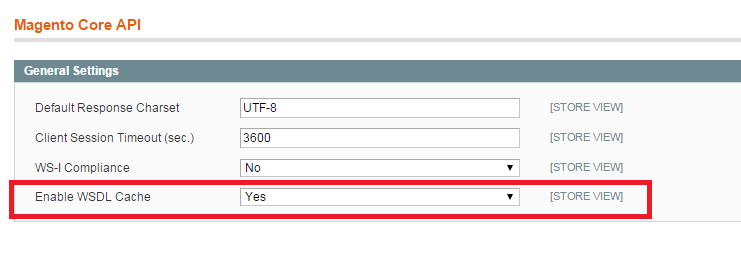
Make sure that WSDL & WSI are set to "no" from System > Configuration > Magento Core API
Magento 1.7 Bug
If you are using Magento version 1.7 there is a known bug. You will need to patch the WSI XML file with the following code. The file is in Magento/app/code/core/Mage/Catalog/etc
Comments
0 comments
Please sign in to leave a comment.