Integration Summary:
- Imports orders
- Option for stock synchronization
- Updates tracking numbers
- Updates despatched status
- Option for new product creation
- Imports product pricing for sales orders
- Channel (module) mapping
Setup:
Guide to obtaining an API Key to setup PrestaShop integration with Fulfillable:
http://doc.prestashop.com/display/PS16/Webservice+Parameters
The following resource permissions are required as a minimum:
- orders
- products
- combinations
- addresses
- countries
- states
- carriers
- product_option_values
If you wish to use stock sync please grant full access to all permissions to ensure functionality.
Account Setup:
| Name | Details | Example |
|---|---|---|
| URL | The Url of the website | htttps://www.examplewebsite.co.uk |
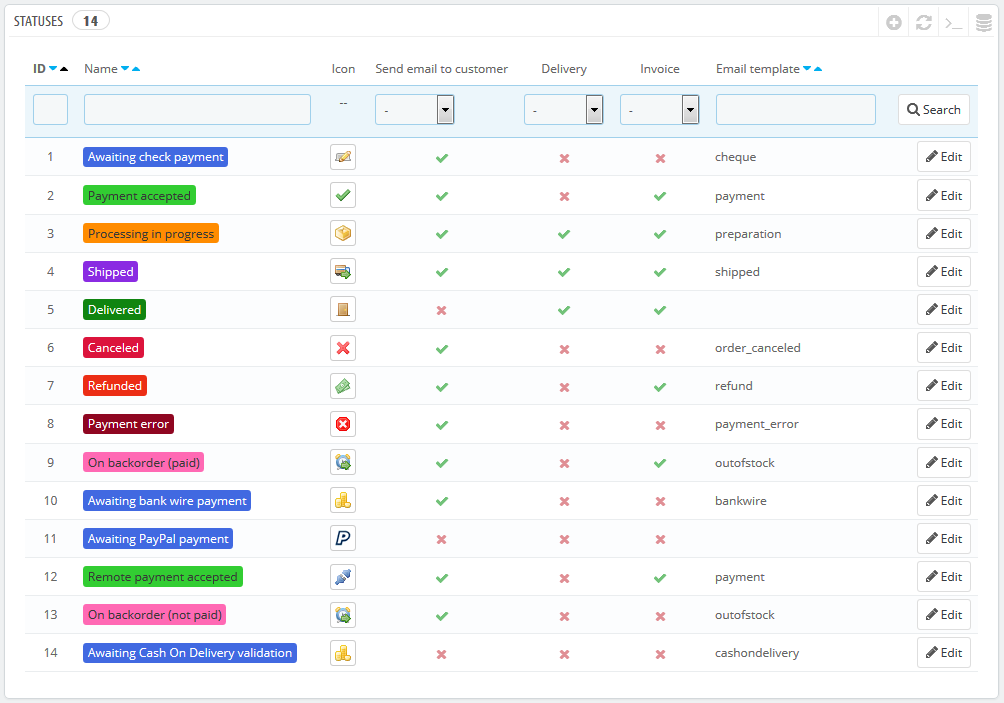
| ImportStatues | The statuses orders need to be in for them to imported this an be one status or multiple |
e.g. 4 Multi statuses can be used separated with pipes e.g. 4|5|6 |
| ProcessingStatus | Status in prestashop the order should be moved to when the order is imported | 5 |
| DespatchStatus | Status in prestashop the order should be moved to when the order id despatched | 4 |
http://doc.prestashop.com/display/PS16/Statuses
Troubleshooting
It's possible to check the API in the browser e.g.
https://www.storeurl.com/api/orders/?filter[current_state]=[ORDERSTATUSID]&output_format=JSON&ws_key=[APIKEY]
Due to the fact PrestaShop is Open Source software it is important to note that the configuration of PrestaShop could affect or reduce the supported functionality of the integration.
Comments
0 comments
Please sign in to leave a comment.